Inside Gumdrop: a Browser-First Music Visualizer
Why I made Gumdrop browser-first, how the audio analysis feeds the scene system, and what makes the product feel lightweight instead of setup-heavy.
- Build Log
- Creative Tools
- WebGL
- Music
- Browser Products
I built Gumdrop because I wanted a music product that felt immediate.
Not a DAW. Not a setup exercise. Not a plugin that only makes sense for one narrow workflow.
I wanted something you could open quickly, point at a room, a speaker, a record player, or a laptop, and turn sound into a live visual environment.
That product goal drove the architecture.
Browser first, on purpose
Gumdrop has a few surfaces, but the web app is the center of gravity.
- the browser app is the main product
- the Spicetify build is a companion for Spotify power users
- the parked Mac prototype is there for future system-audio support
The browser app is the most important one because it has the cleanest first-run story. Open a link, allow microphone access, and it works.
That is a much better onboarding flow than asking someone to install software, route audio internally, or learn a specialized creative tool before they see anything satisfying on screen.
Using the device microphone is a little less technically pure than a direct player integration, but it is better product design for the first experience. It makes Gumdrop useful with speakers, instruments, vinyl, ambient sound, and live rooms.
The core loop
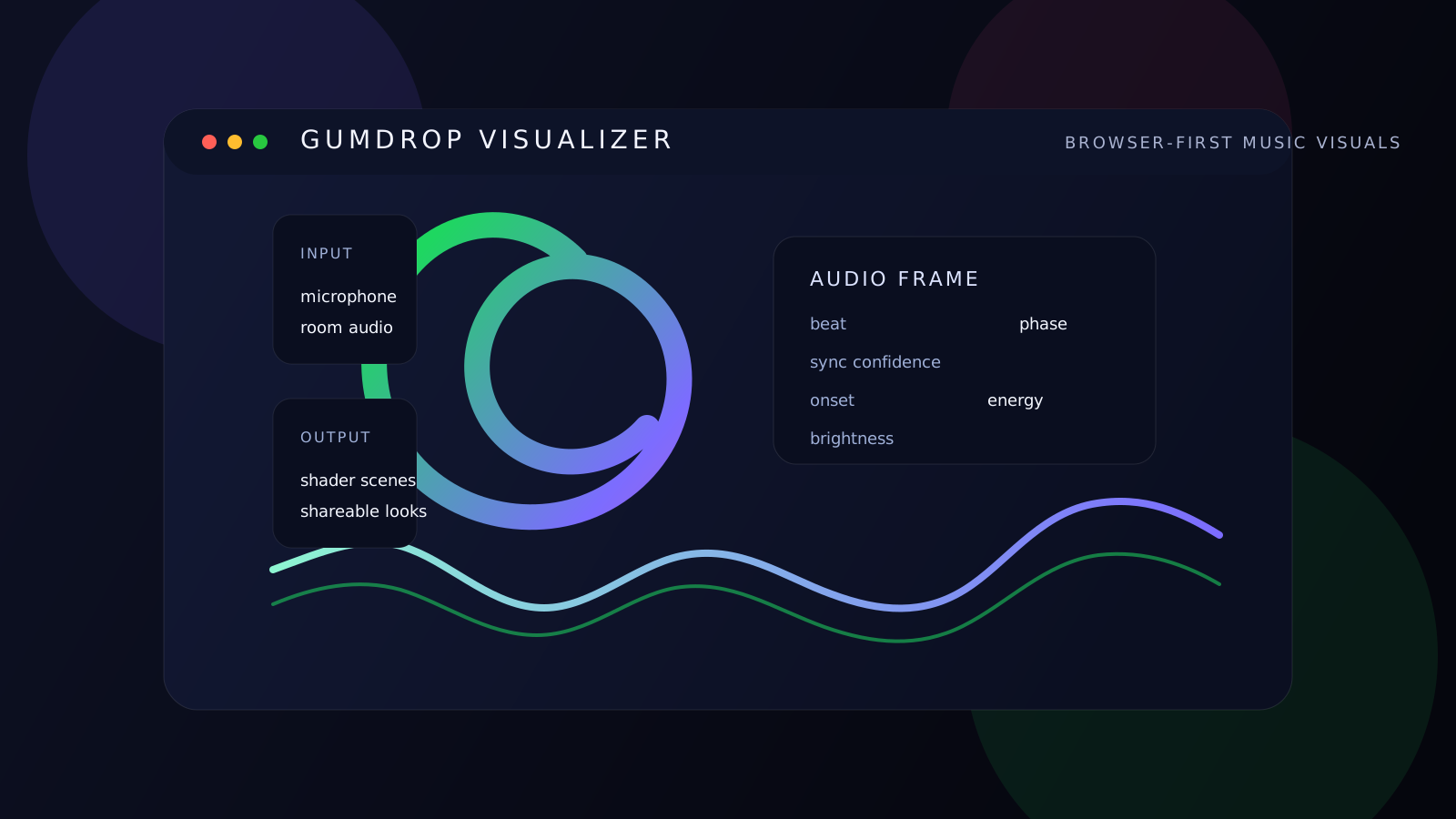
At a high level, Gumdrop does three things:
- captures sound
- turns that sound into a compact music-state frame
- feeds that frame into GPU-rendered scenes
The frontend is a fairly lean React and TypeScript app. The interesting part is the contract between audio analysis and rendering.
The browser stream flows through a small analysis pipeline built around:
getUserMediaAudioContextAnalyserNode- optional
AudioWorkletNodebeat detectors
From there, the app produces a normalized AudioFrame with fields like beat, beat phase, subdivision, sync confidence, BPM, onset, energy, and brightness.
That frame is the bridge between sound and visuals. The renderer does not need raw audio buffers. It just needs a stable snapshot of the musical state.
How the audio side works
The audio analysis is designed to be musical enough to feel alive without becoming fragile in the browser.
There are three layers that matter most.
1. Spectrum and waveform analysis
The app continuously samples both the frequency spectrum and the time-domain waveform. That gives broad signals like low-end energy, brightness, onset intensity, and general room energy.
Those values help the visuals stay responsive even when beat-lock is weak.
2. Multi-band onset detection
On top of the analyser, Gumdrop tracks onset activity across low, mid, and high frequency bands.
That matters because kicks, snares, claps, and hats do not all announce themselves in the same part of the spectrum. By splitting the bands, the app gets a more useful sense of timing than a single blunt detector would.
3. Tempo estimation with confidence
The app keeps a rolling memory of recent events and uses that to estimate tempo and beat interval. It does not immediately pretend it knows the BPM. It builds confidence over time.
That is why the state model includes things like syncConfidence, beatPhase, and related timing values.
This matters for product feel. When Gumdrop is not fully locked in yet, it should still look good. When the pulse stabilizes, the scenes should feel tighter and more intentional.
How the scene system works
The visuals are GPU-rendered with WebGL 2 fragment shaders. Each scene is effectively a small visual instrument.
The shared scene library includes modes like Bloom, Tunnel, Aurora, Orbit, Prairie, and Bubbles. Every scene receives the same core uniform contract:
- time and resolution
- beat and beat phase
- subdivision, bar, and section
- sync confidence
- onset, energy, and brightness
- color channels and palette state
That shared contract is what keeps the product coherent. One scene can pulse on beat. Another can drift on section changes. Another can flash on onset spikes. But they all respond to the same musical model.
It is a better setup than building bespoke logic scene by scene with no common language underneath.
Why sharing matters
One small product choice I really like is that scene and palette state can be shared directly through the URL.
That means people can pass around a specific look without creating an account first. Pick a scene, tune the colors, copy the link, and send it to someone else.
For a creative tool, that lightweight sharing model is often more valuable than adding user accounts too early.
Why local processing matters
Gumdrop does not need to upload audio to be useful. That is good for privacy, and it is also good for feel.
Keeping analysis on-device preserves the responsiveness of the product and avoids turning a simple visual tool into a trust problem. Sometimes the right architecture is the one that keeps the loop tight.
What I think is most interesting about Gumdrop
The project is not just a shader toy. It sits in a product space I like a lot: part ambient interface, part creative tool, part visual instrument, and part shareable browser object.
That mix is what made it worth building. It is expressive and technically opinionated, but still simple enough that someone can use it without a tutorial.
That usually matters more than adding one more clever subsystem.
Related notes: