How I Built a Browser-Based Daily Recruiting Agent
A scrubbed look at the daily agent I use to triage recruiter outreach, check LinkedIn leads, avoid scheduling conflicts, and reduce the mental load of job-search inbox work.
- Agents
- Claude
- Recruiting
- Automation
- Personal Systems
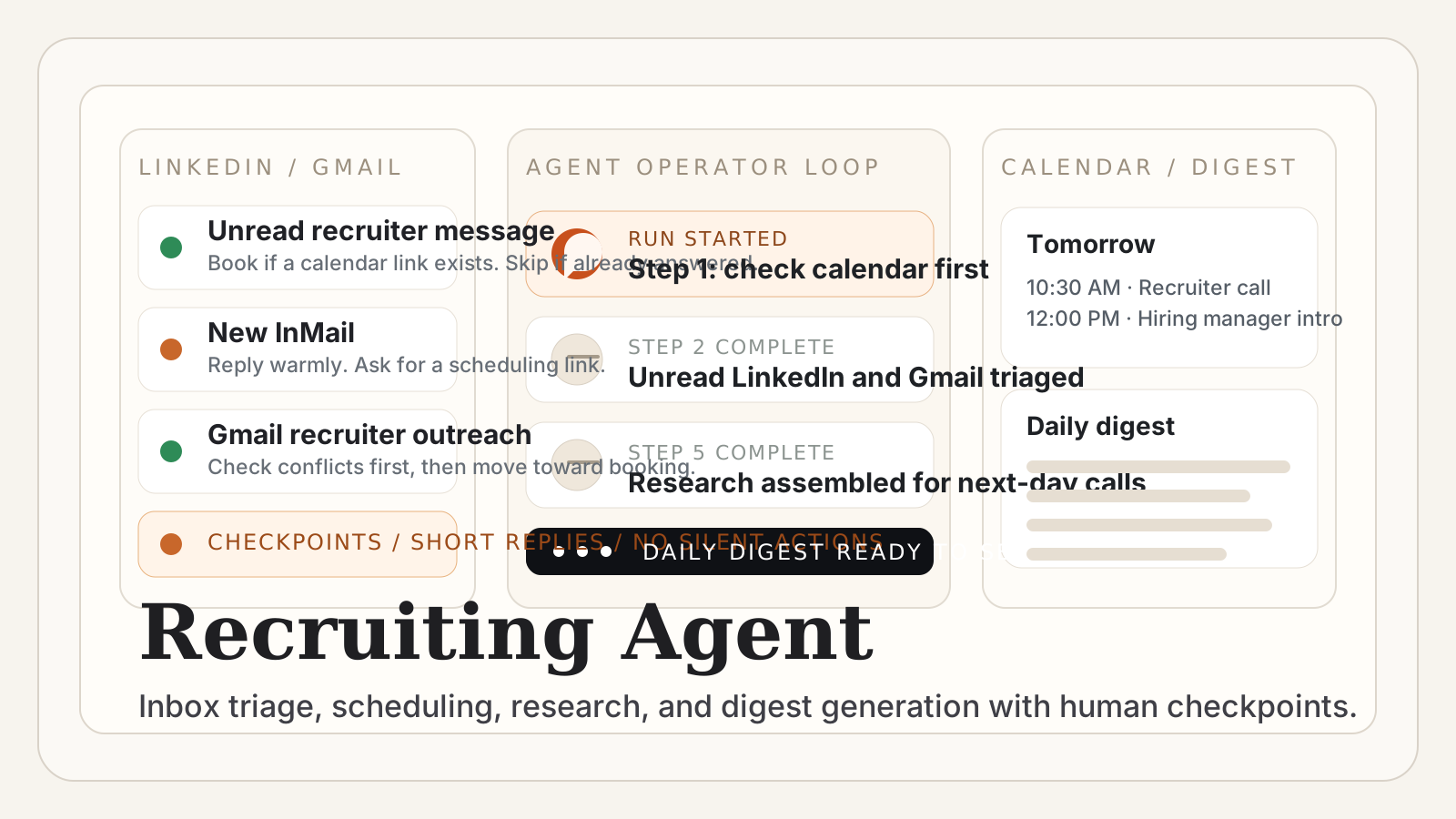
I recently built a daily recruiting inbox agent that works through the browser.
Not a fully autonomous job-search machine. Not a spam bot. Not something that pretends to replace judgment.
It is much simpler than that, and that is why it is useful.
Its job is to take the repetitive, context-heavy work around recruiter outreach and make it lighter:
- check my calendar first,
- scan unread LinkedIn messages and InMails,
- review inbound invites,
- triage recruiter email,
- help book calls without conflicts,
- prepare a daily digest,
- and surface the next things that actually need my brain.
The main benefit is not that it writes perfect messages.
The benefit is that it reduces the mental load of reopening the same loops every day.
The real problem I wanted to solve
Recruiting inbox work is deceptively expensive.
The hard part is usually not writing one reply. The hard part is all the small pieces of state you need to keep loaded in your head:
- Who already got a response?
- Who sent a calendar link?
- Which threads are unread versus merely unresolved?
- What is actually worth responding to?
- Which time windows are still open?
- Which interviews are coming up tomorrow?
- Which recruiter is attached to which company, team, and role?
LinkedIn is especially bad for this.
Checking it rarely feels like one clean task. It feels like reopening a pile of half-finished branches, each with a different level of urgency and different scheduling constraints.
So I did not want an agent that “does recruiting for me.” I wanted an agent that behaves more like a calm operations assistant for a very specific workflow.
I first got it working in Claude in Chrome, but the pattern is broader than that.
It also maps well to Codex when the workflow has browser access.
What matters is not the brand name of the assistant. What matters is having an agent that can move across browser surfaces, hold state, and follow a stable sequence without losing the plot.
Why I used a browser-native agent for this
This was a browser task before it was an AI task.
The workflow spans multiple surfaces:
- Google Calendar
- LinkedIn messaging
- LinkedIn invitations
- Gmail
- public company and interviewer research
That makes browser-native agent behavior much more useful than a pure chat workflow.
The point is not just generation. The point is navigation, state tracking, and structured action across tabs.
Claude in Chrome was a good fit for this kind of job because the work is not one big reasoning problem. It is a sequence problem:
- look at the calendar,
- use that as the conflict reference,
- check unread recruiter outreach,
- book or reply when appropriate,
- research upcoming conversations,
- compile a digest.
Codex can also fit this pattern when the workflow is grounded in browser actions and checkpoints rather than open-ended ideation.
This is exactly the kind of thing I think agents are best at in real life:
not replacing the human, but holding a process together.
The design of the prompt
The prompt is long, but the structure is simple.
I split it into five parts:
- Identity
- Checkpoint protocol
- Ordered steps
- Decision rules
- Messaging style
Here is the scrubbed skeleton:
DAILY RECRUITING INBOX AGENT

IDENTITY
Name: [public name only]
Availability: preferred scheduling window
Always check calendar first

CHECKPOINT PROTOCOL
Print run start
Print step completion after each phase
If interrupted, resume from the last checkpoint
Stop after each step, give update, ask permission to continue

STEP 1 — CALENDAR
Review this week and next week
Log all events
Use as conflict-avoidance reference

STEP 2 — LINKEDIN MESSAGES
Only check unread and InMail
Book meetings if links are provided
Reply briefly and warmly if outreach is legitimate
Skip if spam, already answered, or call already happened

STEP 3 — LINKEDIN INVITATIONS
Accept recruiter/founder invites with hiring context
Ignore unclear or irrelevant invites

STEP 4 — GMAIL
Reply to recruiter outreach
Book from scheduling links when appropriate
Skip confirmations, newsletters, rejections

STEP 5 — RESEARCH
For next-day events, gather company, interviewer, and role context

STEP 6 — COMPILE DIGEST
Actions taken
No action needed
Upcoming appointments
Pending items
Tomorrow's schedule

STEP 7 — SEND DIGEST
Email the digest

GLOBAL RULES
Never book within 24 hours
Always verify calendar conflicts first
Keep replies short and warm
Avoid over-automation on stale threads
The most important part is not the prose. It is the operational shape.
The prompt forces the agent to move in a stable order and use the calendar as the source of truth before it does anything else.
That sounds obvious, but it is exactly the kind of thing that falls apart when people build flashy agents without enough workflow discipline.
The key design choice: checkpoints over autonomy
The best decision in this prompt is that the agent has to stop after each step and ask permission.
That is not there because I am timid about automation. It is there because inbox work mixes low-risk repetition with medium-risk judgment.
I am happy to let an agent:
- scan unread threads,
- summarize context,
- draft warm replies,
- notice calendar links,
- assemble next-day research.
I do not want it silently free-running across every inbox and scheduling surface for an hour without a checkpoint.
This is a good example of my broader philosophy on agents:
agents should carry process, not own consequence.
The human should still sit at the points where taste, context, and risk matter most.
How I actually use it day to day
In practice, I run it once per day like an inbox operator.
The pattern is:
- start the run,
- let it inspect the calendar,
- let it work through unread recruiter surfaces,
- sanity-check the replies and bookings,
- let it compile the digest,
- use the digest as my real dashboard.
That last piece matters more than it sounds.
The digest is the product.
The booking and reply actions are helpful, but the real value is that by the end of the run I have one clean view of:
- what got actioned,
- what was skipped and why,
- what interviews are coming up,
- what I need to watch tomorrow.
Without that, the work remains ambient. It sits in LinkedIn tabs, email threads, and calendar fragments.
With the digest, it becomes operationally legible.
How it responds to recruiters
I deliberately keep the message style conservative.
Short. Warm. Specific. No fake enthusiasm. No over-produced AI tone.
The agent references one or two concrete details from a recruiter message when it can, acknowledges that I have been busy, and tries to move the conversation toward a scheduling link instead of a long back-and-forth.
That matters because the goal here is not “sound impressive.” The goal is reduce friction while staying human.
I do not want the agent inventing a relationship. I want it helping me maintain one.
Why this reduces mental load so much
What I like most about agents is not raw output volume. It is relief from context switching.
A lot of modern work is not hard because each individual action is difficult. It is hard because you have to reload the same pile of context over and over again.
Recruiting outreach is a perfect example:
- identify the real leads,
- remember prior context,
- avoid duplicate replies,
- cross-check timing,
- decide which conversations deserve energy,
- prepare for the next call.
That is exactly the kind of repeated orchestration work that agents should absorb.
The result is not that I stop thinking. It is that I spend less energy on tab archaeology.
More of my attention stays available for:
- evaluating roles,
- deciding which people are worth real time,
- preparing for interviews,
- and noticing patterns in what the market is actually signaling.
What I would not automate
There are also some clear boundaries.
I would not let this agent:
- send cold outbound messages at scale,
- make final decisions about whether a role is a fit,
- book aggressive schedules without review,
- or impersonate a level of enthusiasm I do not actually feel.
This is not a “growth machine.”
It is a personal operations tool.
That distinction matters a lot to me.
The best real-life agent workflows are usually not the most theatrical ones. They are the ones that quietly remove friction from recurring loops while leaving the human with more clarity and less ambient stress.
Why I like this pattern beyond one tool
I do not think the long-term lesson here is “use Claude for recruiting.”
The lesson is that browser-capable agents are becoming genuinely useful for personal operations work.
If the task lives across:
- inboxes,
- calendars,
- tabs,
- lightweight research,
- and short structured replies,
then a browser-based agent can often carry the loop better than a normal chat assistant can.
That is true whether the surface is Claude in Chrome, Codex with browser control, or another agent stack with the same basic capabilities.
The architecture matters more than the logo.
My practical takeaway
This little recruiting agent is a good example of how I think agents should show up in normal life.
Not as synthetic people. Not as replacements for judgment. Not as excuses to avoid thinking.
As process carriers.
It is a browser-based workflow that remembers the order of operations, applies consistent rules, and gives me back a cleaner mental surface to think on.
That is already a meaningful kind of intelligence amplification.
And honestly, for most real-world agent use cases, that is enough.
Related notes:
- How I Think About Agents in Product
- Working Harder and Smarter with Agent Machines
- The New Hybrid Roles AI Teams Actually Need
Best,
Oli
May 14, 2026